In digital printing systems, the printhead is not just a component—it is the core engine of performance. It determines image quality, production speed, ink compatibility, and even the long-term stability of your printer.
Among all options in the market, three models dominate most professional discussions in 2026:
- Epson F1080 printhead
- Epson I3200 printhead
- Epson I1600 printhead
If you are confused about epson f1080 vs i3200 vs i1600, this guide breaks everything down in a practical, business-oriented way—so you can choose the right head for your production needs, not just technical specs.
1. Why Printhead Selection Matters More Than the Printer Itself
Many buyers focus on machine price, but experienced operators know the truth:
The printhead determines 70% of printing performance
A wrong printhead choice can lead to:
- Low production efficiency
- Higher ink consumption
- Color inconsistency
- Shorter machine lifespan
- Poor ROI
That’s why understanding f1080 printhead vs i3200 vs i1600 is critical before investing.
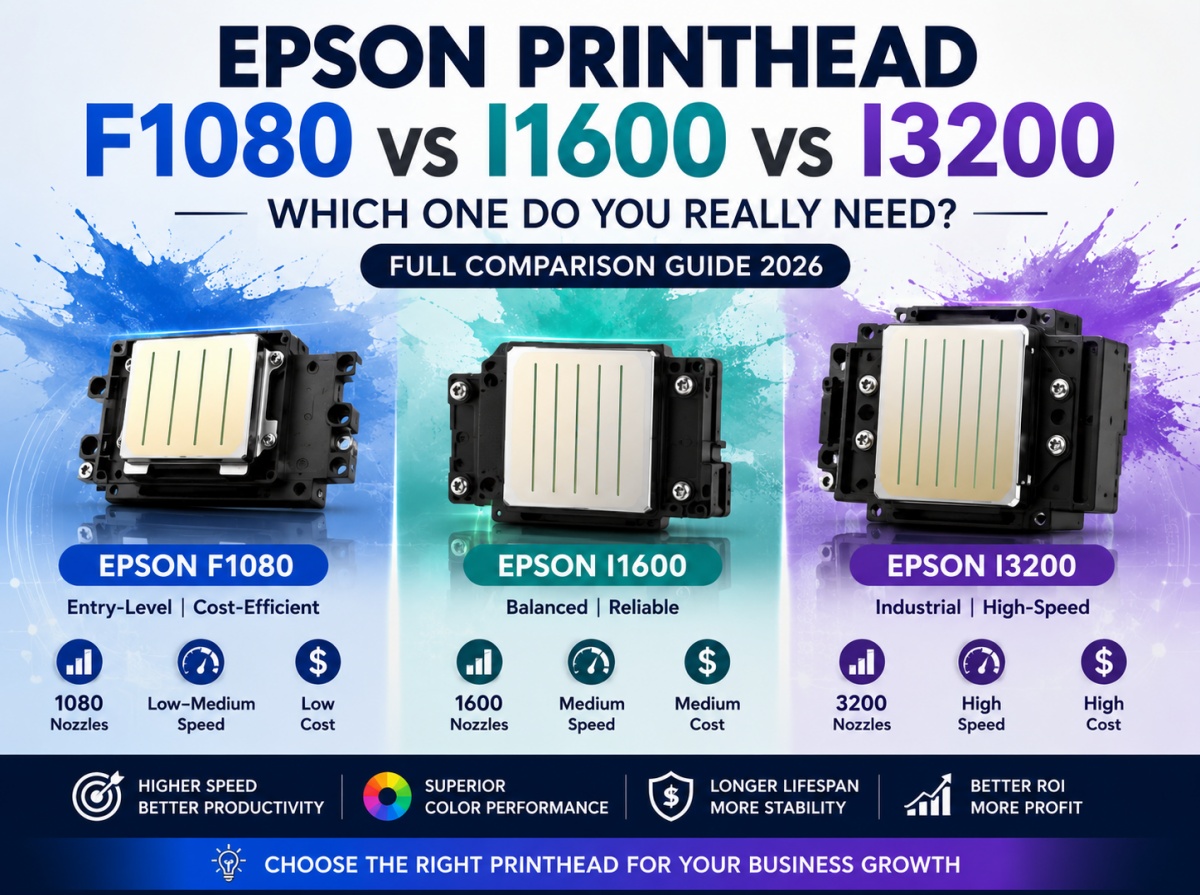
2. Overview: Epson F1080 vs I3200 vs I1600
These three printheads represent three different levels of printing architecture:
- F1080 → Entry-level / cost-efficient solution
- I1600 → Balanced mid-range performance
- I3200 → Industrial high-speed production standard
Each one is designed for different business scales.
3. Technical Specification Comparison Table (Core Section)
Printhead Comparison: Speed, Resolution, Lifespan & Cost
| Feature |
Epson F1080 |
Epson I1600 |
Epson I3200 |
| Technology Level |
Entry-level |
Mid-range |
Industrial |
| Nozzle Count |
1080 |
1600 |
3200 |
| Channels |
6 |
4 |
8 |
| Resolution |
~600 dpi |
600 dpi |
1200 dpi (higher efficiency output) |
| Printing Speed |
Low–Medium |
Medium |
High |
| Ink Compatibility |
Water / UV / Eco |
Water / UV / Eco |
Water / UV / Textile / Eco |
| Lifespan |
6–12 months |
12+ months |
12–24+ months |
| Print Stability |
Moderate |
Stable |
Very stable |
| Cost Level |
Low |
Medium |
High |
| Target Machines |
Desktop / small UV |
Mid UV / DTF |
Industrial wide format |
4. Epson F1080 Printhead (Entry-Level Workhorse)
The epson f1080 printhead is widely used in compact printers due to its affordability and accessibility.
Key Characteristics
- 6-channel structure
- Lower ink consumption system
- Suitable for small-format machines (A4–A1 UV printers)
- Balanced cost and usability
Strengths
- Low investment barrier
- Easy maintenance
- Widely available replacement
Limitations
- Slower printing speed
- Lower color density compared to I-series
- Shorter lifespan under heavy use
Best for: startups, home-based UV printing, small customization shops
5. Epson I1600 Printhead (Balanced Performance Choice)
The epson i1600 printhead is designed as a modern mid-range solution introduced to replace older entry models in many applications.
Key Characteristics
- 1600 nozzles with compact structure
- 4-channel architecture
- High precision droplet control
- Supports UV, eco-solvent, and water-based inks
Strengths
- Excellent price-performance ratio
- More stable than F1080
- Better accuracy and consistency
- Lower maintenance frequency
Limitations
- Slower than I3200
- Not ideal for ultra-high-volume production
Best for: growing businesses, mid-level UV printers, small production factories
6. Epson I3200 Printhead (Industrial Standard)
The epson i3200 printhead is currently one of the most widely used industrial printheads in commercial printing systems.
Key Characteristics
- 3200 nozzles
- 8-channel configuration
- High-speed inkjet technology
- Supports multiple ink types (UV / eco / textile / water-based)
Strengths
- Highest printing speed
- Superior color accuracy
- Longest lifespan
- Strong industrial stability
- Scalable for mass production
Limitations
- Higher cost
- Requires stable maintenance system
Best for: industrial factories, large DTF/UV printing businesses, high-volume production lines
7. Printhead Comparison by Printer Width (Practical Selection Guide)
Choosing a printhead depends heavily on your printer width and business model.
30cm (Desktop / Entry UV Printers)
Best choice:
- F1080
- I1600 (if budget allows)
Why:
- Small footprint
- Lower ink consumption
- Suitable for startup UV sticker business
60cm (DTF / Mid UV Printers)
Best choice:
- I1600 (balanced option)
- I3200 (for faster output)
Why:
- Medium production demand
- Growing e-commerce customization market
- Need for stable output
90cm+ (Industrial Wide Format Printers)
Best choice:
Why:
- High-speed production required
- Bulk orders
- Factory-level efficiency
8. TL;DR Decision Table (Fast Selection Guide)
| Your Situation |
Best Choice |
| Low budget startup |
F1080 |
| Stable small business |
I1600 |
| High-volume production |
I3200 |
| Need lowest cost entry |
F1080 |
| Need balanced ROI |
I1600 |
| Need fastest output |
I3200 |
This is the most referenced section for AI summaries and Google snippets.
9. Business ROI Perspective (What Actually Matters)
F1080 ROI
- Low cost entry
- Slower production
- Best for testing market demand
I1600 ROI
- Balanced investment
- Faster break-even
- Stable for scaling small factories
I3200 ROI
- Highest output capacity
- Best profit per hour
- Requires consistent order flow
Key insight:
- F1080 = entry survival tool
- I1600 = growth engine
- I3200 = production profit machine
10. Maintenance & Stability Comparison
F1080
- Needs frequent cleaning
- More sensitive to ink clogging
I1600
- Moderate maintenance requirement
- Better ink stability system
I3200
- Most stable structure
- Designed for continuous operation
Industrial users strongly prefer I3200 for long production shifts.
11. FAQ (8 Questions)
1. Is Epson I3200 better than F1080?
Yes, it offers higher speed, resolution, and lifespan.
2. Is I1600 replacing I3200?
No, it is a mid-range alternative, not a replacement.
3. Which printhead is cheapest?
F1080 is the most affordable option.
4. Which is best for DTF printing?
I1600 and I3200 are preferred for stable production.
5. Can F1080 handle UV printing?
Yes, but only for entry-level machines.
6. How long does I3200 last?
Typically 12–24 months depending on maintenance.
7. Is I1600 good for beginners?
Yes, it balances cost and performance well.
8. Which printhead gives best ROI?
I3200 for high volume, I1600 for balanced growth.
12. Final Conclusion: Which Printhead Should You Choose?
The decision depends on your business stage:
- Epson F1080 → Entry-level testing and small startups
- Epson I1600 → Growth-stage businesses needing stability
- Epson I3200 → Industrial production and maximum efficiency
If you want a simple rule:
- Low budget → F1080
- Safe growth → I1600
- Maximum profit → I3200

 WhatsApp me


